Some deliveries may take a little longer than usual due to regional shipping conditions.

DOWNLOAD THE APP


Customer Services
Copyright © 2025 Desertcart Holdings Limited
DOWNLOAD THE APP

🖥️ Elevate your workspace, elevate your game — don’t just work, work smart!
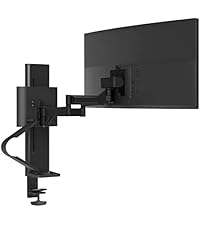
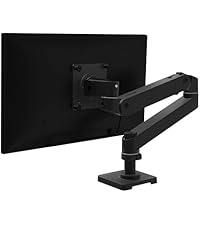
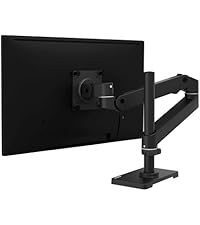
The Ergotron LX Monitor Arm is a premium single-monitor desk mount designed for professional setups. It supports flat, curved, and ultrawide monitors up to 34 inches and 25 pounds, offering 360° rotation and 75° tilt for ultimate ergonomic positioning. With versatile mounting options and built-in cable management, it transforms any workspace into a sleek, organized environment. Built from durable metal and backed by a 10-year warranty, it’s the trusted choice for millennial managers seeking both style and function.





| ASIN | B07Q8TJ2KL |
| Best Sellers Rank | #43 in Computer Monitor Arms |
| Brand | Ergotron |
| Built-In Media | Mounting Arm |
| Color | Matte Black |
| Compatible Devices | Monitor |
| Customer Reviews | 4.6 out of 5 stars 10,769 Reviews |
| EU Spare Part Availability Duration | 1 Years |
| Enclosure Material | Metal |
| Global Trade Identification Number | 00698833073829 |
| Item Type Name | Mounting Arm |
| Item Weight | 9.8 Pounds |
| Manufacturer | Ergotron |
| Material | Metal |
| Maximum Tilt Angle | 75 Degrees |
| Maximum-Supported Screen Size | 34 Inches |
| Minimum-Supported Screen Size | 34 Inches |
| Mounting Type | Tabletop Mount |
| Movement Type | Articulating |
| UPC | 698833073829 |
| Unit Count | 1.0 Count |
| Warranty Description | 10 Years |
B**6
Heavy duty, works GREAT, makes monitor easily repositionable ....
I bought this arm to replace a much cheaper version sold here on Amazon for about $100 less. It just wasn't made quite that well, and did not have the positioning abilities that I wanted, plus it wasn't tall enough for my standing desk. This arm is much, much better - it's very well made and holds my monitor very securely. It's also very easy to move the monitor to just about any position I want with very little effort. So it works for my stand up/sit down workstation, which is just what I needed. Why four stars? Because I am 5'2" tall and this are does not have the height I was looking for. Unless there's an adjustment that I don't know about, maybe. From what I've seen, it looks like the top arm is at its highest position just like in the picture on Amazon. I can get the monitor to go down, but no further up. It's impossible to tell from the very scanty instructions which joints are repositionable and which aren't, so maybe I just don't know how to get it to go higher. And I also may be too picky, but I want my monitor at eye height so I don't have to look down at all, I want to be able to look straight ahead and have my information straight in front of me. This arm is about 3" too short of that. So I have the extension arm on order, and am hoping that will give me the extra couple of inches I want for this arm to be perfect for me. However, this is just a personal preference. Other than that, this is a great piece of equipment, it looks like it's built to last forever!!!! Easy to install, too, even with the crappy instructions. I would recommend this to anyone who needs to be able to reposition a computer monitor regularly, especially if you're in a stand up/sit down workstation like I am. This arm is just perfect for that, with the exception of the height problem. And that may not be a problem for anyone else. If anyone out there knows how to adjust that top arm to go higher than the approximately 45 degree angle it's at please let me know! Overall, very well worth the money and I'm glad I shelled out the extra bucks to move up to this arm from the one I had. Update: I received the extension piece for this monitor arm that is sold here on Amazon. It's basically the same piece as the part that attaches to the pole. It took all of a minute to install and re-position my wiring, and the height problem was solved! Now my monitor is at eye height, which is exactly what I was trying to get accomplished. So now this is a five star review! If you're interested in the extension arm, it's the Ergotron 45-289-026 Mounting Extension. It's a bit pricey for what you get, but it solved my very irritating problem, so it was well worth the money. My workstation is now set up exactly the way I want it, with no eye, neck, or back strain from bending over just a little to get closer to my monitor screen. This is an excellent, heavy duty product and I can see no reason why it should ever need replacement. Here's the link: Ergotron 45-289-026 Mounting Extension
J**Y
Best monitor arm on the market
The Ergotron LX is one of the best monitor arms you can buy on the market. They are an industry brand that sell to businesses so they are reliable. Sure you can buy a way cheaper monitor arm, but this one will retain its tension, doesn’t make any noise while moving it, has great location control, and looks amazing. The installation is easy, and the amount of space it takes up is minimal. I’ve had mine for months now (this is a late review after trying it out for a long time) and I love it. It included everything necessary for installation. I am using it on a 24 inch and 27 inch monitor and it works flawlessly. It holds them well. I would say if you have the money then buy this for sure. Don’t buy a cheaper monitor arm if you can afford to buy this. It’s worth the money.
L**D
Excellent monitor arm
All in all this is a great articulating arm. It's very solidly built, fairly well thought out, and once set up it adjusts easily. When I unpacked, I was surprised at how heavy it was -- it is really solid. There are a couple of small caveats but they aren't enough to diminish my rating. First, the adjustment for the counter-spring for the vertical movement is next to impossible. The design calls for inserting an Allen wrench into the area behind the joint where the monitor mounting plate is attached to engage the rod which controls the spring tension. First, it is pointless to try the adjustment without the monitor in place since it is the monitor's weight one is attempting to counterbalance, and that means that the monitor will make it impossible to see into the recessed area where the wrench needs to go. There is nothing in there to guide the wrench so it is practically impossible to fit it into the hex-head on the end of the rod. Meanwhile, with the monitor and other parts of the arm in the way one cannot just continually turn the wrench -- one must turn it, then remove it and reorient it before inserting it again -- so even getting lucky at getting the wrench seated the first time won't help much. Lucky for me that the factory setting was almost perfect for my monitor so I didn't have to monkey with this that much. It is a bad design and I hope they are smart enough to change it for future offerings. My second caveat is really minor, but it just seems like they could have easily handled it better. One installation option involves installing the arm on a surface by running a bolt in the platform of the arm through a hole in the table's surface and then using a wingnut to clamp a small plate underneath the mounting surface. This works well but the bolt is very long -- I'm not sure why they need a bolt that long. In my case, there was a drawer beneath the surface where I was mounting it and the excess length of the bolt interfered with the drawer. One option to fix this is to use a shorter bolt -- that might not be easy to do, however. Where the bolt fits through the platform of the arm, it drops into a square hole and the bolt has a square section at the top of its shaft which locks into that square hole to keep the bolt from turning. It might not be that easy to find a replacement bolt with that square section as I suspect that it is not a standard part. Another option is to take a hack saw and cut off the excess portion of the bolt. Unless there is sufficient room in the mounting area to accommodate a hack saw, this would entail mounting the arm, marking the place to cut the bolt and then removing the arm to retrieve the bolt (and one would likely need a vise to hold the bolt while cutting). It would have been easy to avoid all of this, however. The bolt itself is at the bottom of the hollow upright tube which the arm is mounted on -- if they had just welded a nut to the platform and threaded the bolt through a lock-nut, then the welded nut, it could be adjusted to whatever height was desired before installing. To avoid having to install, mark the bolt, and then remove for adjustment, one could likely just estimate the length needed based on the surface on which it is to be mounted (to be fair, one could do the same with the hacksaw method but with the downside of needing to obtain a new bolt if the estimated length turned out to be too short). One last complaint involves the provisions for cable control -- the cavity in the arm for passing the cables is a little awkward to use and seems a bit small. It works well enough, however -- the real problem is that there is nothing similar for the upper arm and since a little slack is needed in the cables to allow for moving the monitor around, angling the screen, etc., one is faced with having cables drooping down behind the monitor. I alleviated this a bit by using some velcro ties to hold the cables to the upper arm so that the slack portion is only from the end of the arm to the monitor. These are minor quibbles, however, and only affect the setup. Once the arm is in place and adjusted, it works great, easily holds my 22 inch monitor, and I am very happy with it.
E**C
Great monitor arm, much better than the newer model. Absolutely solid in every way
VERY glad I read reviews on this and the model that has replaced this one as a successor--the reviews I read said that the new replacement model (dubbed an upgrade/pro by Ergotron) is in fact just a redesign using cheaper materials and same price. I made sure to purchase this model (the older one) and am very glad that I did. The install is very quick and simple, the materials are solid and streamlined (the other ones I used had larger than necessary builds, too thick bases, etc), and moves in all the right ways. They could do a slightly better job with built-in cable management but that is easily mitigated with velcro straps or zipties etc. I definitely recommend this monitor arm, I am using it on a 34" curved ultrawide, and I did not need to adjust the settings on the unit at all--the size and weight of my monitor made it work out of the box. DEFINITELY make sure to pay attention to the different ways that you can adjust tension on the device to get your perfect setup.
J**Z
Great functionality and quality parts
This mount is perfect for what I bought it for - having a lot of versatile movement of my monitor, so that it can be adjusted frequently. This mount is not a set-and-leave type, where you need to set it once and stick with that location. You can adjust it as much as you want, and it holds position. The only adjustment that may take some time to make is the position of the arm on the pole, because a ring underneath the arm must be adjusted to maintain the height position. However, the height range without adjusting the arm is already pretty significant, and I do not see that it would be necessary to adjust the arm height on the pole very often. Adjustments are smooth and they stick - I do not have problems with the monitor falling out of position after I adjust it. The other reason that I picked this particular unit (besides the ability to adjust frequently and easily) is the tall pole. This provides a larger range of movement, and if your monitor is on the upper end of the rated size scale, you will probably need it. I was really happy about this choice, and although I have not really needed that extra height yet, I am really happy that I have the potential for it. When the mount arrived in the box, my first impression was that the parts were all solid and well-made, heavy construction. Assembly was really easy (no-brainer) and when put together, it was clear that the quality construction was as solid as I thought, and all parts worked smoothly together and fit easily. Ergotron did not stinge on any of the parts - they are all solid, good quality. I mounted it to the desk with the clamp, instead of drilling holes, because the desk will be moved to a new apartment soon, and I want to have flexibility of placement in the new place. The clamp provided good stability for my monitor, and I have had no problems with vibrations or the clamp slipping while I am adjusting. I may leave it in the clamp even after moving, since I have not had any problems with it. I was torn about purchasing the dual mount so that I could have the flexibility of setting up dual monitors in the future, but ultimately decided not to. Now that I have the mount, I realize that I can buy the same mount again and mount both arms on a single pole to achieve the same setup as the dual mount system. Or I can set the mounts side by side. So, I feel I made the right choice and I am not limited. Overall summary: highly recommend! Pros: quality parts, solid construction, easy assembly, easy adjustment, adjustments hold after you make them, extra height range with tall pole, choice between clamp or through-desk mounting, rotates freely between portrait and landscape viewing (fun fact - this rotational direction is not limited at all except by your cables that will wind up if you continue to rotate - you could keep rotating indefinitely if your monitor were cordless). Cons: takes a little more time to adjust the height position of the arm on the pole (this is no big deal for me). Also, having a wall directly behind the mount will limit movement away from you to some degree, because the arm will be restricted by the wall - you will not be able to retract it as far against the wall as you would if the desk were free-standing. However, it seems obvious that you will not be able to achieve the full range of movement if there are obstructions.
A**K
This is the 5th product in its line I've tried - I'd buy again.
I have tried many desk mount monitor arm products and this is by far the best. Sadly it is the most expensive. Here is what made a difference to me: 1: Stable (other products as well, but this one FEELS stable whereas the others do not) 2: Assembly (best in class - including heavy monitor installation) 3: Ease of use (best in class - easy to maneuver, easy to move, stays put) 4: Aesthetics (bought the aluminum version and it looks really good) 5: Quality (this is by far the heaviest, beefiest, well made product in its line) The cons list is short: 1: Price (it's expensive, but has from what I can see a best in class warranty offsetting a lot of the inherent cost) 2: The set screw ring eats into the back of the post. I wish they would have used a channel or something to help remedy the digging in. This will in time show to my room. 3: There is no limiter like the HX (however no others I have used has this to my knowledge) My setup: ----- ------------ ----- | | | | | | |2K | | 4K | | 2K| | | | | | | ----- ------------ ----- Each of the 2k 27" monitors use this product. The 43" 4k monitor uses the Ergotron HX. The 2k left back faces the room. The 4k back faces the corner of my desk. The 2k right is up against a wall. My right monitor is mounted 11" from the wall with 1/4 gap from the wall to the arm. Math is needed to get it right, so be cautious. The HX has a limiter on the arm. On the cons, I can look past the price as it is a buy once cry once item and a 10 year warranty which means this will definitely outlast my other arms I have in other rooms at a fraction of the cost increase in price over the other items I would trust my expensive monitors to. I have had this monitor setup for 6 years and will likely continue to do so for my workstation. It is PLENTY of space for all my VMs, documents, photo editing, side browser window TV, and communication platform. I expect these arms to last at least 10 years, but if they don't and the warranty does NOT cover something, I will buy another set. I do not expect any of my other monitor arms to last past 3 years. Another item to check out based on my findings: the AVTL is the 2nd heaviest duty mount I found. For non-critical mounting, that is a good mount in my opinion. HOWEVER, I do not know the US presence of the company and do not know how long the mount will last with its 3 year warranty. I am not saying this is the best mount out there but it works for me. I have another room with the AVLT Dual 13"-43" Mount. I paid less than $190 after tax. The same dual monitor setup here cost almost $650. I do expect to come close to the same cost per year on both items (with the Ergotron edging out slightly at $65 per year vs AVTL $63.33 per year if it lasts the full warranty term). HOWEVER, if you compare apples to apples and do not use a dual monitor mount, now the value is with the Ergotron. The same setup with AVTL as I have on my main workstation (3 single arm mounts) would have cost around $450 after tax whereas the full Ergotron setup set me back $955. Now the cost per year is in the favor of Ergotron for sure as one of my monitors is at the brink of breaking 33lbs (so I did not want to use the almost at limit arm from AVTL where I couldn't find their US presence easily). I hope this helps someone else out there make their decision but I do NOT have any buyers remorse (but I just got them installed today so... YMMV)
T**M
This is it.
Amazing. So, here's my setup - I'm using one of those desks that can alternate between sitting/standing with a push of a button. This is fantastic, but whether I was standing or sitting, I always came back to the same problem - my monitor height from the base of my desk was too low. What started out as a search for just a monitor stand eventually turned into a search for monitor arms because, let's face it, having options is never a bad thing. So, I spent a lot of time looking at various monitor arms in the $30-$60 range. Over a long week, I patiently read all reviews, noted the different arm combinations/dimensions, and paid particular attention to the cons of each product. Although it hurt my eyes the first time I saw the price tag on this beauty, I eventually realized it was the closest thing I would find to meet my functional expectations, and settling for anything else would probably bring more frustration than satisfaction in the long term. Ever bought something cheaper in order to save money, but ended up getting rid of it and buying the more expensive item anyway? Yeah, that sucks because you end up paying even more than the original cost. So... I stopped procrastinating and decided I would give it a shot, besides, we're talking about Amazon - I could always return it if I didn't like it. :) Here are some bullet points taken from my overall experience: -setup out of the box was easy -the mount/arm are very well built -my desk is less than one inch, but the mount fit like a glove and the unit is very firm! My overall productivity at my work desk has increased greatly. Now that I'm able to move into whatever position is comfortable, and manipulate my monitor position with ease, I am not sure how I ever lived without it. I am also very happy that I didn't "cheap out" and buy some of the other monitor arms that I was looking at previously. Speaking of which, one of them was a monitor arm attached to a 31 inch pole. Imagine that... a 31 inch pole protruding from the base of your desk like a giant antenna. No way! The Ergotron arm is very stylish, highly functional, exceptionally well built, and very easy to adjust. It has exceeded my initial expectations. It is a dream. I keep thinking it's going to disappear because it's too good to be true. Although it's not always the case, sometimes you really do get what you pay for. I'm very happy for making this purchase... very satisfied with the results.
C**E
Compatible with 27" Wacom Cintiq Pro!!!
The latest Wacom Cintiq 27" comes with a 100x100 mm VESA mount which is compatible with the Ergotron LX arm. I installed my Ergotron LX using the bolt-through option to in order to get the Wacom tablet to reach a little past my desk edge. The Ergotron LX has absolutely no problem holding this 20 lb Wacom tablet in place. It's very easy to move around once you customize the tension of each of the joints using the supplied hex wrench. I can't recommend it enough. The installation video is super helpful--there is a QR code to scan to access the video instructions. This mount is super sturdy and stays in any orientation while drawing, I can rotate the entire thing 360-degrees, which is an absolute dream. Save yourself some serious cash and buy this mount instead of that absurdly overpriced $470 wacom stand. This thing is so much better. This is the Wacom Tablet I bought that is shown in the pictures below: https://www.amazon.com/Wacom-Creative-Display-Pressure-DTH271K0A/dp/B0B43T9HPC/ref=sr_1_1?crid=LYMCW288L3XZ&dib=eyJ2IjoiMSJ9.aI840oxeyP3yZYrYLbLiRKBFTK-eb33t0rXY_vGxU79KwFwvo1uhnRXg5lyeWJ5h4flvtLxqCNEEc8UidYnrYMR94ku3wTuLJpVxtyGpP0lHhQxzVn6xoCU8haq6hjlyWqb0siiEa-30dDBqwcTaJ94EjbB0h5B7LWJPW9_qVP_MBfRz-4-6Dt1aeWn4BTveGEEUTyYzLlECReZo7HKJ6YtcFOtfMdsSnNzyddj6Rqg.H47UnJNzhPO24HVnPfZy6HNlZ8-3GptF-CYID2bQzqQ&dib_tag=se&keywords=wacom%2B27%2Bcintiq%2Bpro&qid=1744856849&sprefix=wacom%2B27%22%2Bcinti%2Caps%2C117&sr=8-1&th=1
Trustpilot
3 days ago
3 weeks ago